Explorance MLY 3.4: More Control, Privacy, and Consistency for Qualitative Insights


Turning qualitative feedback into actionable insights is only part of the challenge. As organizations look to share those findings more broadly, they also need to manage who can access what, how respondent confidentiality is protected, how analytical approaches are standardized, and how decisions are communicated.
Explorance MLY 3.4 addresses these challenges with thoughtful enhancements designed to give organizations greater control over how feedback is shared and analyzed, while strengthening privacy, consistency, and transparency across the experience.
“As organizations make greater use of qualitative feedback, the ability to share and analyze it responsibly and consistently becomes just as important as the feedback itself. MLY 3.4 helps organizations extend the value of qualitative feedback by giving teams greater control over what they share, stronger safeguards for respondent privacy, and more consistent approaches to analysis.”
— Explorance Product Team
What's New in MLY 3.4
MLY 3.4 brings four enhancements focused on giving organizations greater control over how results are shared, protected, analyzed, and managed:
1. Share the insights that matter most
Different audiences need different views of feedback. A manager may need findings related to their team, while an executive may need a broader organizational perspective.
Sharing Content Selection gives organizations greater flexibility to create audience-specific analysis experiences. Instead of providing every recipient with the same view, organizations can select the questions and types of results they want to make available to each audience.
Organizations can now choose which analyzed questions are included in a shared view and determine which results recipients can access, including alerts, recommendations, topic sentiments, and topic recommendations. These selections can also be combined with existing data and demographic filters to create a more targeted sharing experience.
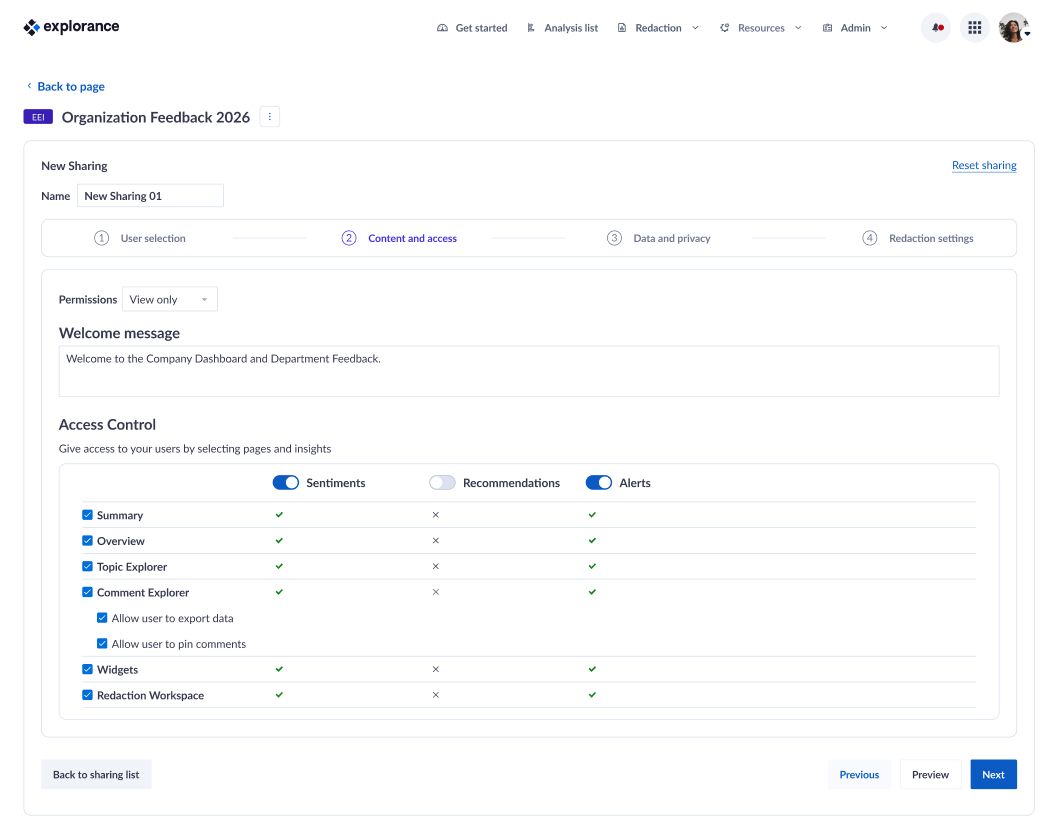
2. Protect respondent confidentiality while expanding access
Making feedback available to more people should not come at the expense of respondent privacy.
With Confidentiality Threshold, organizations can define the minimum number of respondents required before results are displayed within a shared analysis. When demographic filters produce results below that threshold, those results are hidden, helping prevent potential re-identification risks.
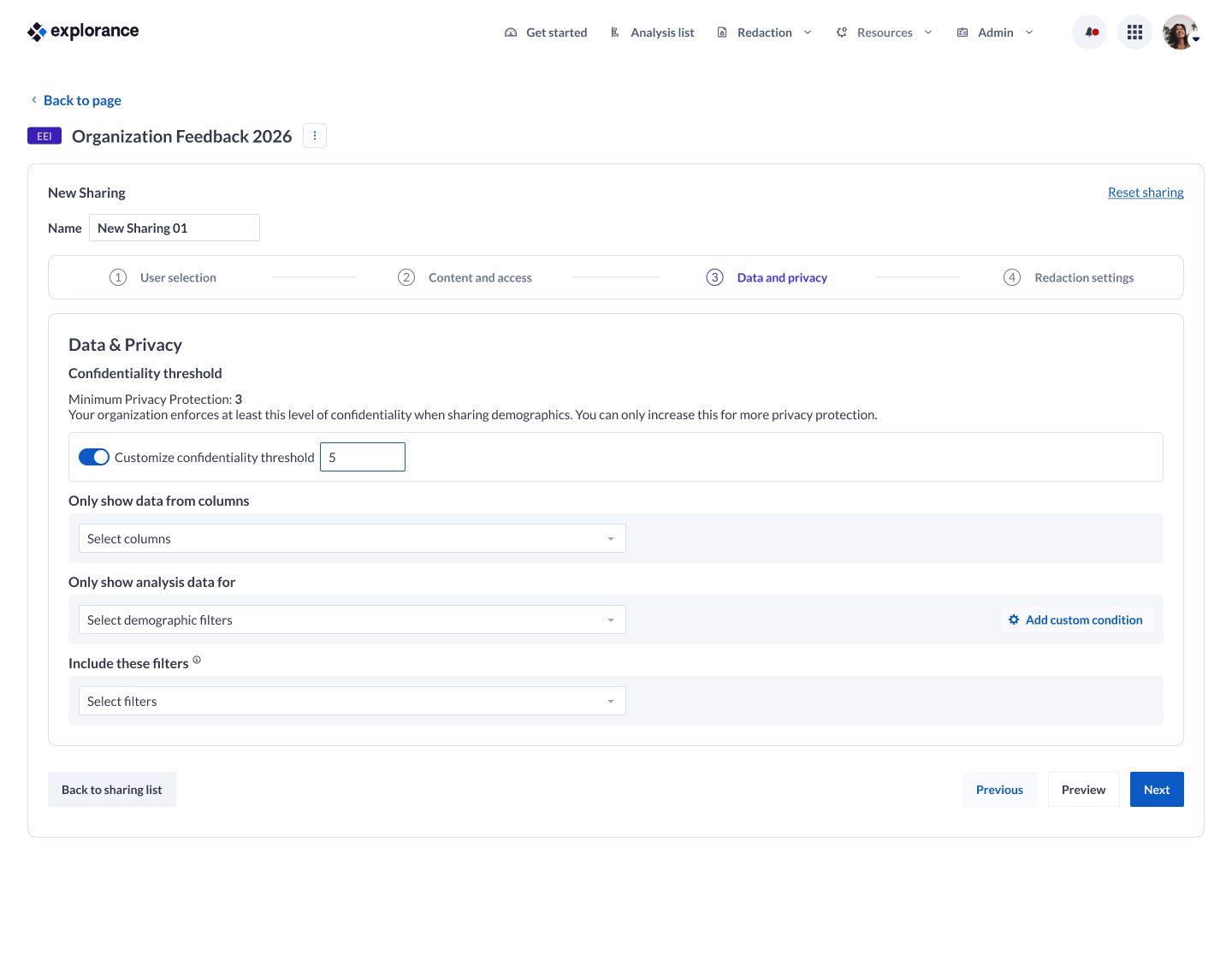
3. Make standardized analytical models easier to use
Organizations often develop analytical frameworks that reflect their priorities, methodologies, or industry requirements. Managing these models consistently across an environment can add administrative effort.
Default Global Custom Models simplifies that process by allowing approved models to be made available across the platform. Instead of configuring models individually, administrators can enable organization-wide models, so users can immediately access standardized analytical frameworks.
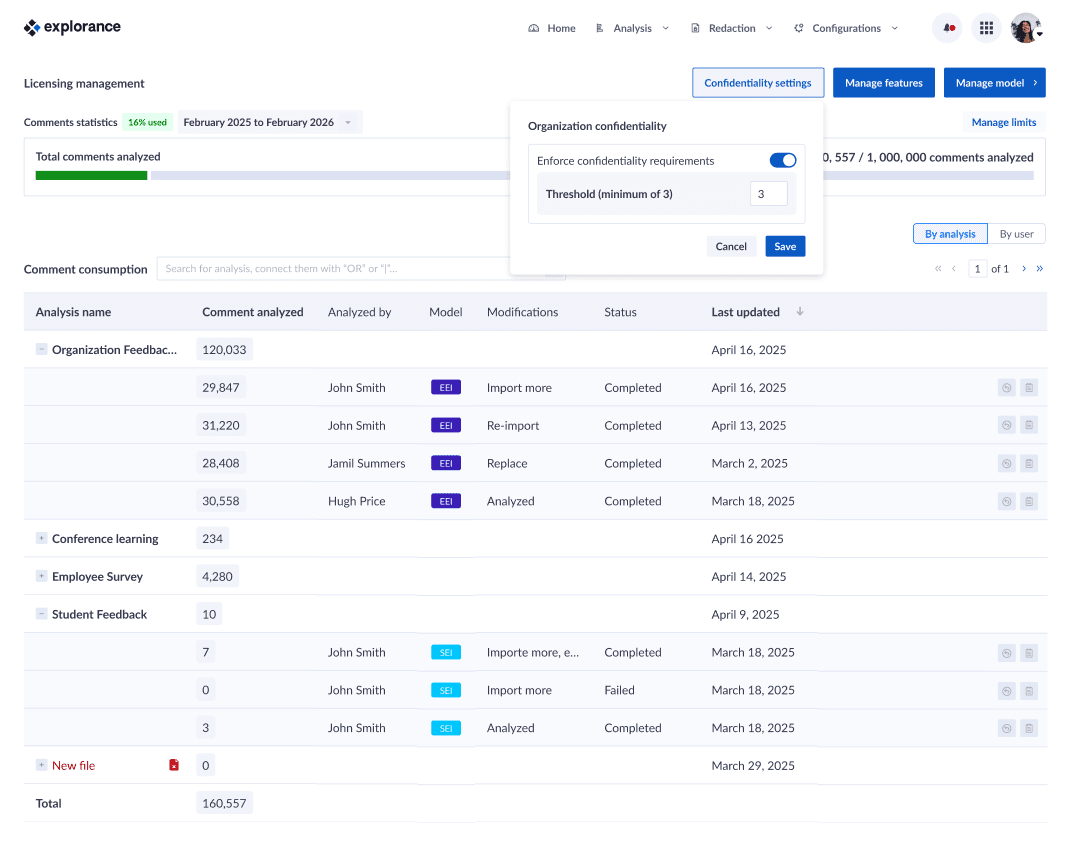
4. Bring more transparency to redaction decisions
Redaction workflows play an important role in protecting sensitive feedback, but decisions are more useful when requestors understand the reasoning behind them.
With Redaction Request Reviewer Notes, analysis owners and administrators can optionally provide context when approving or rejecting a redaction request. The note is displayed directly to the requestor on the My redaction requests page, giving them a clearer understanding of the decision and helping reduce unnecessary back-and-forth.
Key Benefits Across User Groups
Analytics Administrators
- Create audience-specific shared analysis experiences by controlling which questions and results are accessible.
- Establish organization-wide confidentiality thresholds to help protect respondent anonymity.
- Enable standardized custom models across the platform with less administrative effort.
- Manage default models centrally through feature configuration.
Analysts and Analysis Owners
- Share more relevant findings with different audiences based on their specific needs.
- Combine content selections with existing data and demographic filters for more targeted analysis experiences.
- Apply standardized analytical models to support consistent analysis.
- Provide context around redaction decisions and improve communication with requestors.
Analysis Recipients
- Access only the insights intended for their audience.
- Benefit from privacy safeguards when viewing results through demographic filters.
- Receive clearer explanations when redaction requests are approved or rejected.
- Stay informed through in-app and optional email notifications about redaction decisions.
Get Started with MLY 3.4
Ready to take advantage of the latest MLY capabilities?
Contact the Explorance Support team to request your upgrade to MLY 3.4 and start benefiting from these new enhancements.
Related Articles





Learn more about Explorance's products, solutions, and the company.

'%3e%3cpath%20d='M5.83968%2010.4004L7.09855%2015.7752L1.29959%2021.5843L1.23852%2021.642C1.21137%2021.6692%201.18762%2021.6997%201.16047%2021.7235C0.481112%2022.4372%200.0747675%2023.3674%200.0127211%2024.3508C-0.0493254%2025.3343%200.236888%2026.3082%200.821155%2027.1016C0.885626%2027.1865%200.950095%2027.2713%201.01796%2027.3493C1.0306%2027.3649%201.0442%2027.3796%201.05868%2027.3935C1.16422%2027.5192%201.27755%2027.6382%201.398%2027.7497L1.4455%2027.7939L1.67624%2028.0246L9.14125%2035.4896L20.0334%2024.6043L5.83968%2010.4004Z'%20fill='white'/%3e%3cpath%20d='M13.1078%2039.4493L9.78247%2042.761L15.1539%2041.5055L20.98%2047.3113L21.0411%2047.369L21.1225%2047.4504C21.8375%2048.1288%2022.7681%2048.5345%2023.7517%2048.5965C24.7354%2048.6585%2025.7096%2048.373%2026.5041%2047.7897C26.5889%2047.7253%2026.6737%2047.6608%2026.7518%2047.5929L26.7959%2047.5522C26.9233%2047.4401%2027.0434%2047.3199%2027.1556%2047.1925C27.1709%2047.1795%2027.1845%2047.1647%2027.1963%2047.1484L27.4304%2046.9211L34.8954%2039.4561L23.9999%2028.5605L13.1078%2039.4493Z'%20fill='white'/%3e%3cpath%20d='M34.8921%209.76194L38.2072%206.45019L32.8358%207.70228L27.0199%201.89315L26.9588%201.83207C26.9317%201.80492%2026.9045%201.78117%2026.8808%201.75403C26.1658%201.07561%2025.2352%200.669967%2024.2515%200.607946C23.2679%200.545924%2022.2937%200.831473%2021.4992%201.41471L21.2515%201.61491L21.204%201.65902C21.0833%201.7643%2020.9699%201.87767%2020.8646%201.99833L20.8239%202.04245L20.5932%202.2664L13.1282%209.73141L23.9999%2020.6473L34.8921%209.76194Z'%20fill='white'/%3e%3cpath%20d='M47.1789%2022.1067C47.1181%2022.0204%2047.0524%2021.9377%2046.9821%2021.859L46.9414%2021.8149C46.8301%2021.6867%2046.7099%2021.5665%2046.5817%2021.4552L46.5376%2021.4145L46.3069%2021.1838L38.8419%2013.7188L27.9531%2024.6041L38.8419%2035.4928L42.157%2038.8046L40.9015%2033.4332L46.7073%2027.624L46.7683%2027.5663L46.8464%2027.4815C47.5267%2026.769%2047.9337%2025.8392%2047.9958%2024.856C48.0579%2023.8727%2047.771%2022.8992%2047.1857%2022.1067H47.1789Z'%20fill='%230050C1'/%3e%3c/g%3e%3cdefs%3e%3cclipPath%20id='clip0_6641_12689'%3e%3crect%20width='48'%20height='47.9966'%20fill='white'%20transform='translate(0%200.603516)'/%3e%3c/clipPath%3e%3c/defs%3e%3c/svg%3e)