Explorance BlueX 2.2: Building More Agile, Secure, and Data-Driven Feedback Experiences


BlueX 2.2 strengthens the platform’s ability to support more advanced survey creation, secure data collection, and flexible feedback experiences. This release introduces:
- Greater control over live surveys with Administrator Pause and Continue.
- Simplified survey migration with the new Qualtrics Connector.
- Richer academic and technical content creation with a Mathematical Equation Editor and LaTeX support.
- Enhanced tracking through Survey URL Parameter Support.
- Improved response quality with optional CAPTCHA protection for public surveys.
- More accurate reporting with N/A response options for calculated results.
What’s New in BlueX 2.2
As organizations expand feedback programs across increasingly diverse audiences and use cases, survey teams need tools that support flexibility, reliability, and meaningful insights. BlueX 2.2 helps institutions and organizations design better feedback experiences, protect data integrity, and gain deeper understanding from every response.
"The biggest challenge in feedback today isn't creating surveys, it's creating feedback experiences that people trust, adapt to changing needs, and produce reliable insights. BlueX 2.2 helps organizations build that confidence by making survey management more flexible, response data more trustworthy, and transitions from legacy platforms significantly easier."
— Explorance Product Team
1. Greater Control Over Live Surveys with Administrator Pause and Continue
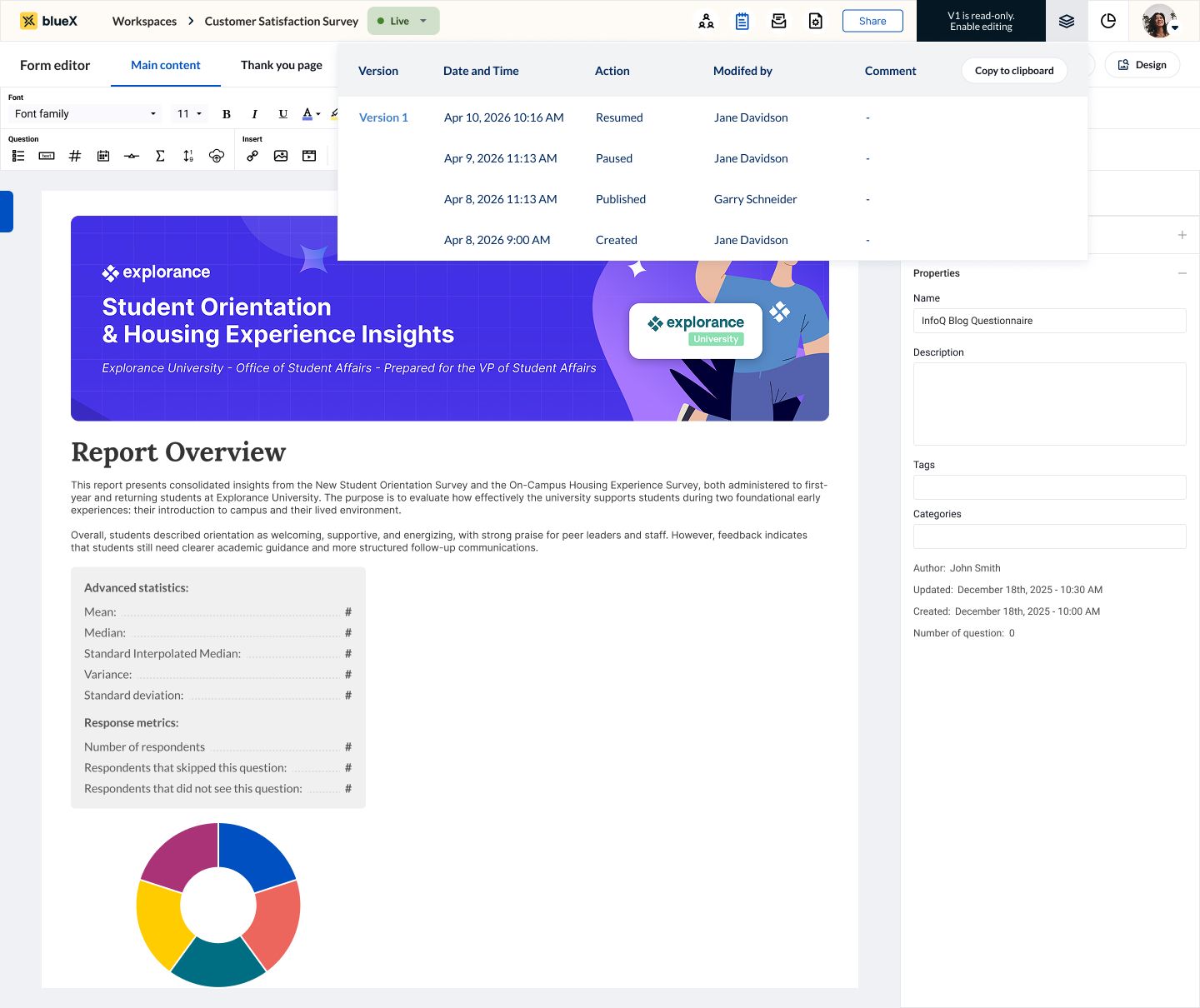
Survey administrators can now pause active surveys, make required updates, and resume data collection when ready. This added flexibility allows teams to respond to changing requirements without creating new surveys or disrupting the feedback process, ensuring greater control over live survey administration.
2. Simplified Survey Migration with the Qualtrics Connector
BlueX 2.2 introduces the Qualtrics Connector, making it easier for organizations to transition existing surveys into BlueX.
Survey authors can now import Qualtrics QSF files directly into new or existing BlueX surveys. Imported surveys can append questions to an existing survey or populate an empty survey, eliminating the need to manually rebuild content.
Organizations migrating from Qualtrics can preserve existing survey structures, reduce migration effort, and accelerate the transition to BlueX while minimizing manual errors.
3. Mathematical Equation Editor with LaTeX Support for Advanced Content Creation
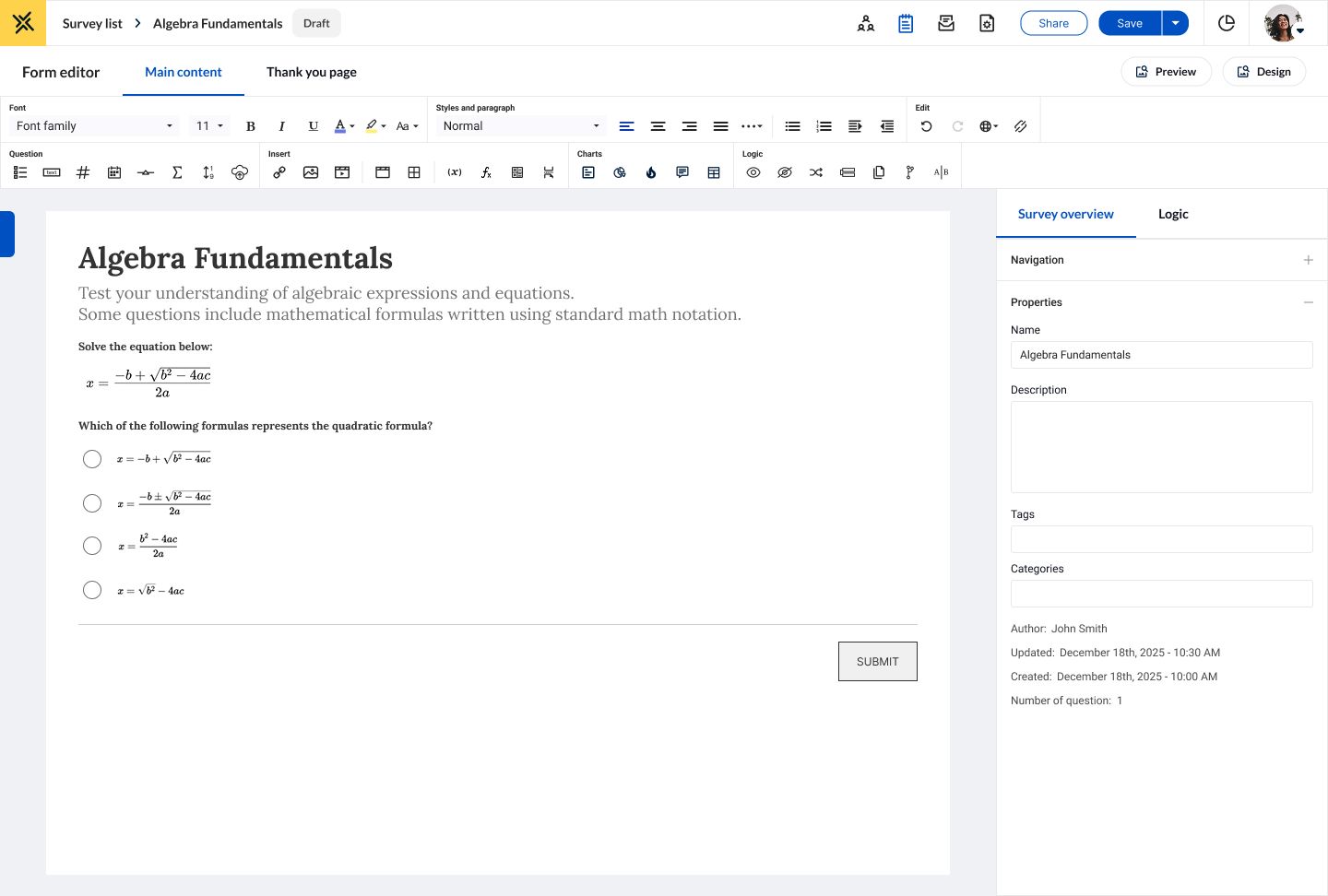
Survey authors can now create, edit, and display complex equations directly within BlueX wherever rich text is supported. The editor combines an intuitive visual interface with advanced LaTeX input, allowing users to build precise mathematical content in the way that best fits their workflow.
Institutions can create richer assessments and interactive learning experiences across disciplines where formulas, equations, and technical notation are essential, including mathematics, engineering, science, and statistics.
4. Improved Tracking and Personalization with Survey URL Parameters
Survey authors can configure unique URL parameters for different distribution channels and campaigns. BlueX automatically captures these values from incoming survey links, enabling teams to identify where responses originate, compare channel performance, and surface response patterns through overview widgets.
With greater visibility into how respondents arrive at a survey, organizations can optimize distribution strategies, deliver more personalized experiences, and gain deeper insights into their feedback data.
5. CAPTCHA Protection and Access Controls for More Secure Survey Experiences
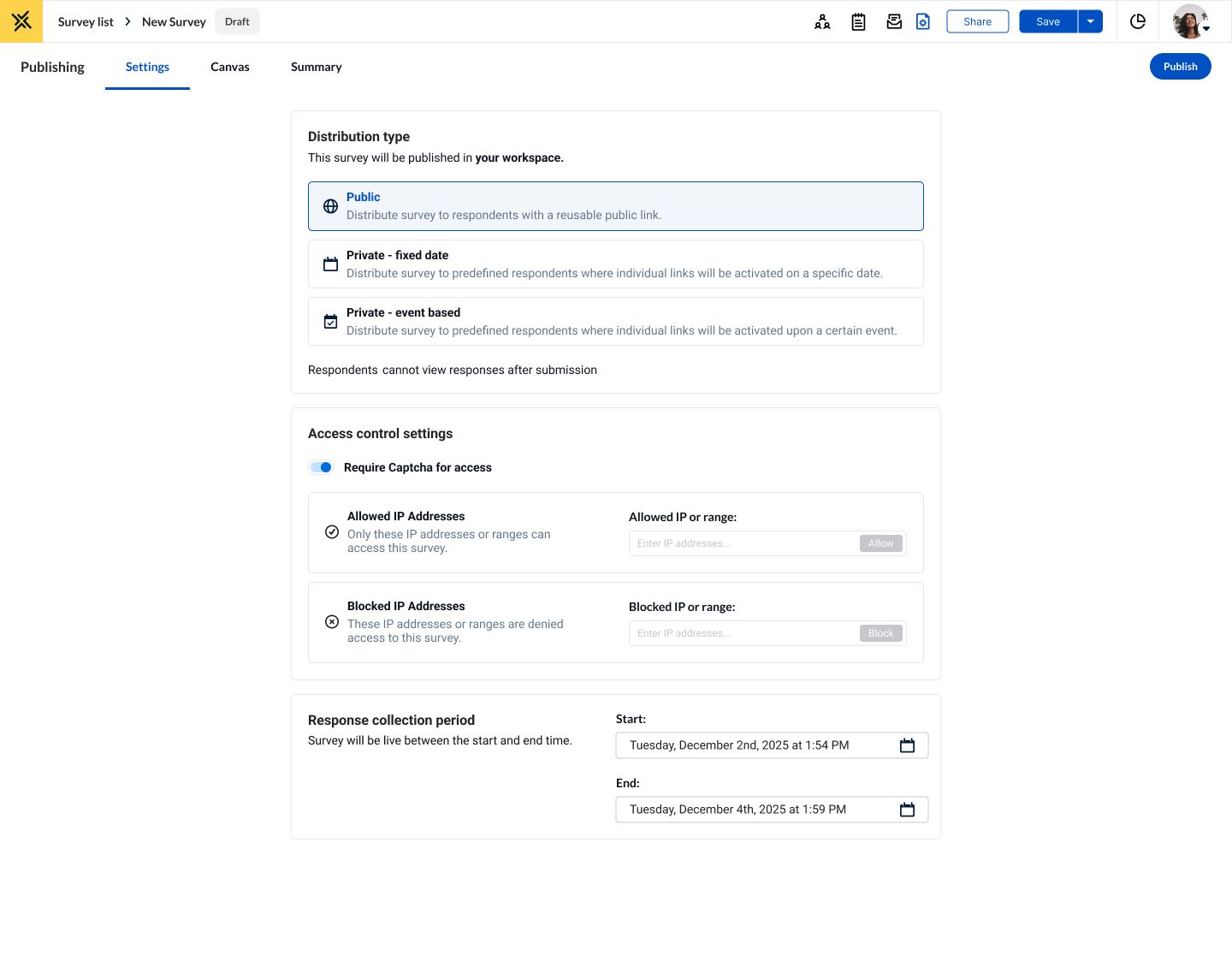
BlueX 2.2 introduces optional CAPTCHA protection and enhanced IP-based access controls to help organizations safeguard public and unauthenticated surveys.
As organizations increasingly rely on open survey links to gather feedback, maintaining trustworthy response data is critical. CAPTCHA provides an additional layer of protection against spam, bot-generated responses, and automated traffic, while IP allow and block lists give administrators greater control over who can access a survey. Teams can restrict participation to trusted networks, such as campus IP addresses, or block known spam or unwanted IP addresses from submitting responses.
6. More Accurate Insights with N/A Response Options for Calculated Results
Not every question is relevant to every participant. Giving respondents the option to select N/A helps prevent inaccurate calculations caused by forced responses. The result is cleaner data, more meaningful reporting, and greater confidence that survey results accurately reflect real experiences.
Key Benefits Across User Groups
Survey Authors and Administrators
- Create richer surveys and interactive content with advanced mathematical equation support.
- Manage live surveys more effectively with the ability to pause, update, and continue data collection.
- Protect public survey experiences with additional security controls.
- Accelerate survey migration by importing existing Qualtrics surveys into BlueX.
Feedback Program Owners and Analysts
- Gain clearer visibility into response sources through URL parameter tracking.
- Improve reporting accuracy with stronger measurement controls.
- Better understand audiences through segmentation and personalization data.
- Reduce manual effort when transitioning survey programs between platforms.
Respondents and End Users
- Engage with more dynamic surveys featuring richer content and formatting.
- Experience more personalized feedback journeys through prefilled information and adaptive survey flows.
- Participate in more secure feedback experiences designed to protect response integrity.
Upgrade to BlueX 2.2 Today
Ready to take advantage of the latest BlueX capabilities?
Contact the Explorance Support team at support@explorance.com to request your upgrade to BlueX 2.2 and start benefiting from these new enhancements.
Related Articles





Learn more about Explorance's products, solutions, and the company.

'%3e%3cpath%20d='M5.83968%2010.4004L7.09855%2015.7752L1.29959%2021.5843L1.23852%2021.642C1.21137%2021.6692%201.18762%2021.6997%201.16047%2021.7235C0.481112%2022.4372%200.0747675%2023.3674%200.0127211%2024.3508C-0.0493254%2025.3343%200.236888%2026.3082%200.821155%2027.1016C0.885626%2027.1865%200.950095%2027.2713%201.01796%2027.3493C1.0306%2027.3649%201.0442%2027.3796%201.05868%2027.3935C1.16422%2027.5192%201.27755%2027.6382%201.398%2027.7497L1.4455%2027.7939L1.67624%2028.0246L9.14125%2035.4896L20.0334%2024.6043L5.83968%2010.4004Z'%20fill='white'/%3e%3cpath%20d='M13.1078%2039.4493L9.78247%2042.761L15.1539%2041.5055L20.98%2047.3113L21.0411%2047.369L21.1225%2047.4504C21.8375%2048.1288%2022.7681%2048.5345%2023.7517%2048.5965C24.7354%2048.6585%2025.7096%2048.373%2026.5041%2047.7897C26.5889%2047.7253%2026.6737%2047.6608%2026.7518%2047.5929L26.7959%2047.5522C26.9233%2047.4401%2027.0434%2047.3199%2027.1556%2047.1925C27.1709%2047.1795%2027.1845%2047.1647%2027.1963%2047.1484L27.4304%2046.9211L34.8954%2039.4561L23.9999%2028.5605L13.1078%2039.4493Z'%20fill='white'/%3e%3cpath%20d='M34.8921%209.76194L38.2072%206.45019L32.8358%207.70228L27.0199%201.89315L26.9588%201.83207C26.9317%201.80492%2026.9045%201.78117%2026.8808%201.75403C26.1658%201.07561%2025.2352%200.669967%2024.2515%200.607946C23.2679%200.545924%2022.2937%200.831473%2021.4992%201.41471L21.2515%201.61491L21.204%201.65902C21.0833%201.7643%2020.9699%201.87767%2020.8646%201.99833L20.8239%202.04245L20.5932%202.2664L13.1282%209.73141L23.9999%2020.6473L34.8921%209.76194Z'%20fill='white'/%3e%3cpath%20d='M47.1789%2022.1067C47.1181%2022.0204%2047.0524%2021.9377%2046.9821%2021.859L46.9414%2021.8149C46.8301%2021.6867%2046.7099%2021.5665%2046.5817%2021.4552L46.5376%2021.4145L46.3069%2021.1838L38.8419%2013.7188L27.9531%2024.6041L38.8419%2035.4928L42.157%2038.8046L40.9015%2033.4332L46.7073%2027.624L46.7683%2027.5663L46.8464%2027.4815C47.5267%2026.769%2047.9337%2025.8392%2047.9958%2024.856C48.0579%2023.8727%2047.771%2022.8992%2047.1857%2022.1067H47.1789Z'%20fill='%230050C1'/%3e%3c/g%3e%3cdefs%3e%3cclipPath%20id='clip0_6641_12689'%3e%3crect%20width='48'%20height='47.9966'%20fill='white'%20transform='translate(0%200.603516)'/%3e%3c/clipPath%3e%3c/defs%3e%3c/svg%3e)