Explorance Metrics That Matter 9.8: Built for Simpler, More Flexible Workflows


Managing learning programs means balancing evolving organizational needs with efficient day-to-day workflows. Explorance Metrics That Matter (MTM) 9.8 builds on that balance with thoughtful improvements designed to make everyday experiences more efficient, flexible, and intuitive.
Shaped by ongoing customer conversations and feedback, this release reflects our commitment to continuously improving MTM around the way organizations work. It’s about listening to what matters, turning those insights into meaningful improvements, and helping administrators get more from their day-to-day workflows.
“Every enhancement in MTM 9.8 started with our clients. They shared where they needed greater efficiency and flexibility, and we listened. We turned their feedback into practical improvements designed to simplify everyday workflows and make MTM work better for the people who rely on it every day.”
— MTM Product Management Team
What's New in MTM 9.8
Release 9.8 introduces three focused enhancements designed to streamline your daily workflows, reduce administrative friction, and give you greater flexibility in managing assessments and learner data.
1. Excel Fallback for Comment Exports
Keep Your Data Flowing Beyond 30 Days
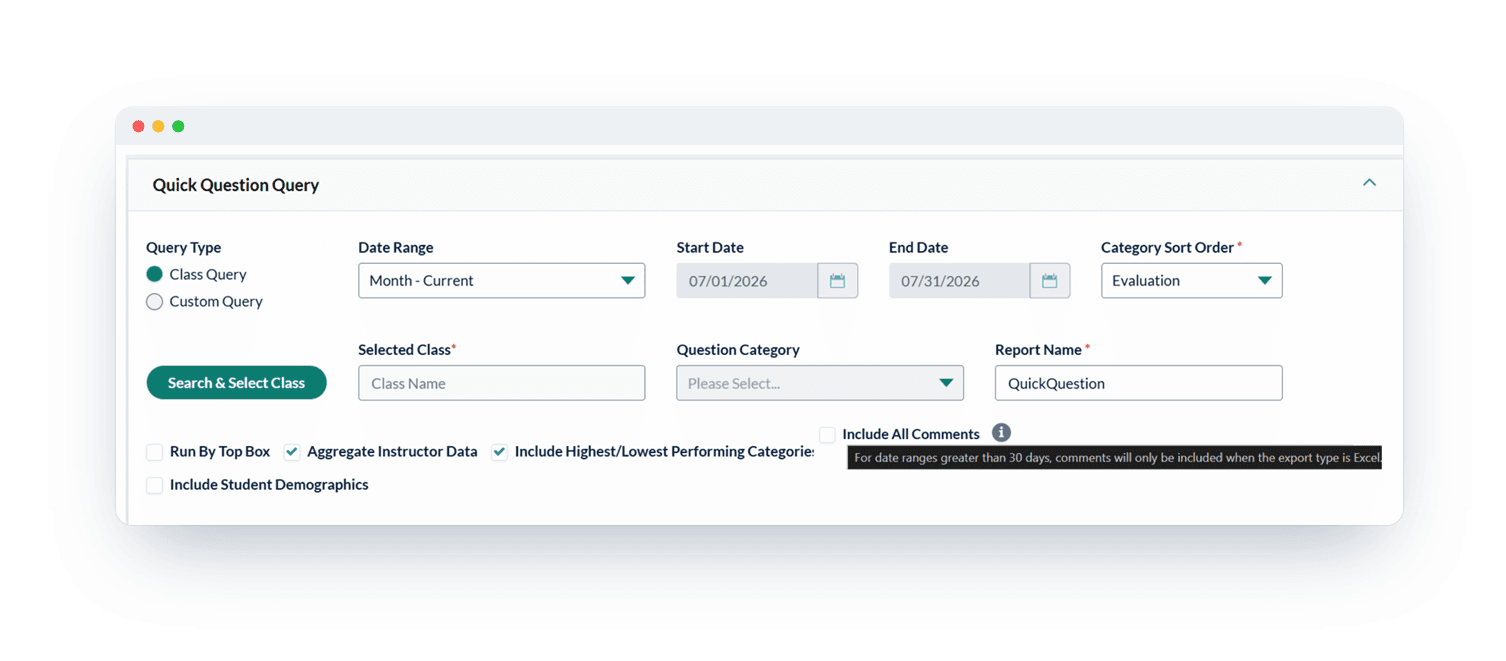
Valuable feedback shouldn’t become harder to access simply because the standard export window has passed. With MTM 9.8, comments can now be exported through an alternative Excel-based method beyond the 30-day window.
What this means for administrators:
- Keep access to historical feedback beyond the standard 30-day export window
- Use an alternative export method when additional comment data is needed
- Work with data in Excel for easier access and analysis
2. Get All Your QR Codes in One Go
Bulk Download for Classes and Blended Learning
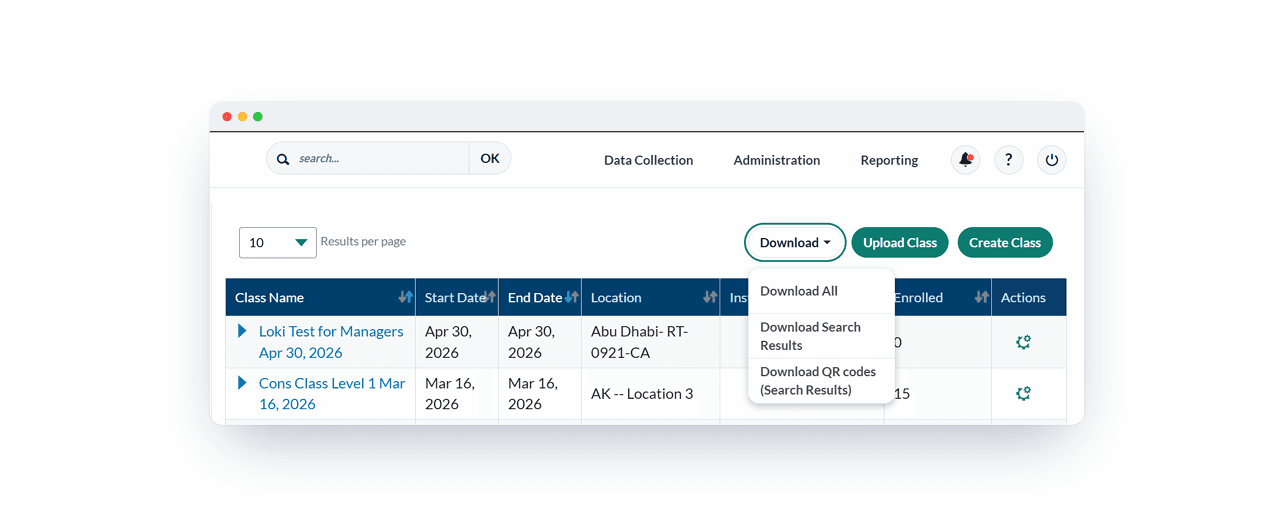
Downloading QR codes individually can turn a simple task into a time-consuming one. MTM 9.8 makes it easier to get the QR codes needed for each workflow, with the ability to bulk-download QR codes for Classes and Blended Learning in separate ZIP files.
With bulk downloads, administrators can:
- Save time by eliminating repetitive, individual downloads
- Download in one step instead of opening each record separately
- Stay organized with all QR codes packaged in one convenient ZIP file
- Support multiple workflows across Classes and Blended Learning
3. More Freedom to Manage Test Retakes
Flexible Retake Settings
Every organization has different approaches to assessments and learner progression. MTM 9.8 gives administrators more flexibility by removing previous restrictions around retake days and attempts.
Now, organizations can:
- Set retake policies around their needs with limits configurable up to 9,999 days
- Allow greater flexibility in retake days based on organizational requirements
- Manage retake attempts more freely with limits configurable up to 9,999 attempts
- Support different learning scenarios by giving learners more opportunities to revisit and retry assessments
- Provide a more flexible testing experience for learners
Built Together, Improved Together
MTM 9.8 reflects an ongoing partnership with our clients. Their feedback plays an important role in shaping the evolution of MTM, helping us identify opportunities to simplify workflows, increase flexibility, and address the needs of today’s learning organizations.
Together, we continue to shape MTM around what matters most to the organizations that use it.
Related Articles





Learn more about Explorance's products, solutions, and the company.

'%3e%3cpath%20d='M5.83968%2010.4004L7.09855%2015.7752L1.29959%2021.5843L1.23852%2021.642C1.21137%2021.6692%201.18762%2021.6997%201.16047%2021.7235C0.481112%2022.4372%200.0747675%2023.3674%200.0127211%2024.3508C-0.0493254%2025.3343%200.236888%2026.3082%200.821155%2027.1016C0.885626%2027.1865%200.950095%2027.2713%201.01796%2027.3493C1.0306%2027.3649%201.0442%2027.3796%201.05868%2027.3935C1.16422%2027.5192%201.27755%2027.6382%201.398%2027.7497L1.4455%2027.7939L1.67624%2028.0246L9.14125%2035.4896L20.0334%2024.6043L5.83968%2010.4004Z'%20fill='white'/%3e%3cpath%20d='M13.1078%2039.4493L9.78247%2042.761L15.1539%2041.5055L20.98%2047.3113L21.0411%2047.369L21.1225%2047.4504C21.8375%2048.1288%2022.7681%2048.5345%2023.7517%2048.5965C24.7354%2048.6585%2025.7096%2048.373%2026.5041%2047.7897C26.5889%2047.7253%2026.6737%2047.6608%2026.7518%2047.5929L26.7959%2047.5522C26.9233%2047.4401%2027.0434%2047.3199%2027.1556%2047.1925C27.1709%2047.1795%2027.1845%2047.1647%2027.1963%2047.1484L27.4304%2046.9211L34.8954%2039.4561L23.9999%2028.5605L13.1078%2039.4493Z'%20fill='white'/%3e%3cpath%20d='M34.8921%209.76194L38.2072%206.45019L32.8358%207.70228L27.0199%201.89315L26.9588%201.83207C26.9317%201.80492%2026.9045%201.78117%2026.8808%201.75403C26.1658%201.07561%2025.2352%200.669967%2024.2515%200.607946C23.2679%200.545924%2022.2937%200.831473%2021.4992%201.41471L21.2515%201.61491L21.204%201.65902C21.0833%201.7643%2020.9699%201.87767%2020.8646%201.99833L20.8239%202.04245L20.5932%202.2664L13.1282%209.73141L23.9999%2020.6473L34.8921%209.76194Z'%20fill='white'/%3e%3cpath%20d='M47.1789%2022.1067C47.1181%2022.0204%2047.0524%2021.9377%2046.9821%2021.859L46.9414%2021.8149C46.8301%2021.6867%2046.7099%2021.5665%2046.5817%2021.4552L46.5376%2021.4145L46.3069%2021.1838L38.8419%2013.7188L27.9531%2024.6041L38.8419%2035.4928L42.157%2038.8046L40.9015%2033.4332L46.7073%2027.624L46.7683%2027.5663L46.8464%2027.4815C47.5267%2026.769%2047.9337%2025.8392%2047.9958%2024.856C48.0579%2023.8727%2047.771%2022.8992%2047.1857%2022.1067H47.1789Z'%20fill='%230050C1'/%3e%3c/g%3e%3cdefs%3e%3cclipPath%20id='clip0_6641_12689'%3e%3crect%20width='48'%20height='47.9966'%20fill='white'%20transform='translate(0%200.603516)'/%3e%3c/clipPath%3e%3c/defs%3e%3c/svg%3e)